
在Github上設定了一些自動觸發建置的專案,但我希望有個地方可以收集這些專案的建置結果,該怎麼做呢?
工作環境是習慣將deploy結果透過腳本,發送到slack特定頻道
但個人使用上,就只想要看到這些side project有在跑,有沒有跑壞而已
那就串進Telegram吧,後續有機會我會再介紹我家其他使用Telegram的場景
申請Telegram Bot
尋找用戶 @BotFather,這是Telegram官方申請機器人相關服務的帳號
在聊天視窗輸入
/newbot→ 輸入顯示名稱 → 輸入user name(必須是bot結尾) → 拿到BOT_TOKEN把Bot加進你的Telegram群組
在群組發一則訊息,然後開新分頁輸入以下網址,帶入在步驟2.取得的
<BOT_TOKEN>
https://api.telegram.org/bot<BOT_TOKEN>/getUpdates
api會回覆最近幾則Bot收到的訊息,格式會像是
{
  "ok": true,
  "result": [
    {
      "update_id": 00000,
      "channel_post": {
        "message_id": 3,
        "sender_chat": {
          "id": -000000,
          "title": "some-title",
          "type": "channel"
        },
        "chat": {
          "id": -000001,
          "title": "some-title",
          "type": "channel"
        },
        "date": 1769742168,
        "text": "123"
      }
    }
  ]
}在你要讓機器人發佈訊息的群組,找到群組的chat.id
在Github專案設定Secrets
進入要發送通知的Github專案,進入Settings → Actions secrets and variables → Actions
增加Repository secrets
- TELEGRAM_TOKEN
- TELEGRAM_CHAT_ID
在Github Action中使用appleboy/telegram-action
yml
jobs:
  deploy:
  # ...
  notify:
    runs-on: ubuntu-latest
    needs: deploy
    if: always()
    steps:
      - name: Notify Telegram (Success)
        if: needs.deploy.result == 'success'
        uses: appleboy/[email protected]
        with:
          token: ${{ secrets.TELEGRAM_TOKEN }}
          to: ${{ secrets.TELEGRAM_CHAT_ID }}
          format: html
          disable_web_page_preview: true
          message: |
            <b> ✅ 部署成功</b>
            📦 <b>專案: </b> <code>${{ github.repository }}</code>
            🌿 <b>分支: </b> <code>${{ github.ref_name }}</code>

      - name: Notify Telegram (Failure)
        if: needs.deploy.result == 'failure'
        uses: appleboy/[email protected]
        with:
          token: ${{ secrets.TELEGRAM_TOKEN }}
          to: ${{ secrets.TELEGRAM_CHAT_ID }}
          format: html
          disable_web_page_preview: true
          message: |
            <b> ❌ 部署失敗</b>
            📦 <b>專案: </b> <code>${{ github.repository }}</code>
🌿 <b>分支: </b> <code>${{ github.ref_name }}</code>格式選用html是可以比較方便調整樣式,但要注意Telegram沒有允許全部tag,可看Telegram文件
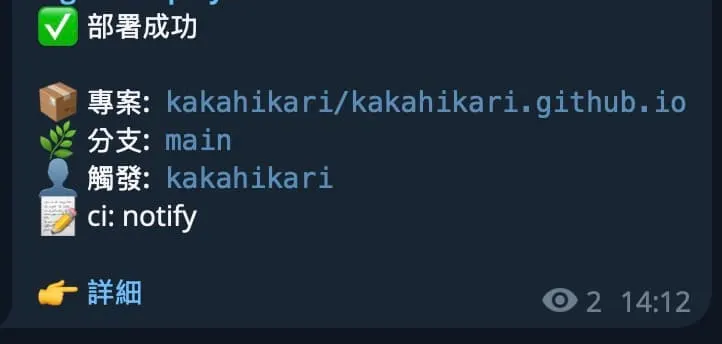
收到通知像是這樣
多專案共用的workflow
照剛剛的做法,很快的每個專案在自己的ci都有一份notify,要是我想要統一改格式不就要每個專案改了嗎 🫠
這時可以開一個共用的專案,專門放共用的workflows
直接參考我個人共用的shared-workflows
這樣在每個專案下只要寫使用共用workflows就行了,要記得繼承SECRET,若workflows來源不是同個帳號無法繼承,就用帶入的
yml
notify:
  needs: deploy
  if: always()
  uses: kakahikari/shared-workflows/.github/workflows/notify.yml@main
  with:
    deploy_result: ${{ needs.deploy.result }}
  # 必須要繼承SECRET
  secrets:
    inherit
    # 若不是同個帳號的無法繼承 就直接帶入
    # TELEGRAM_TOKEN: ${{ secrets.TELEGRAM_TOKEN }}
    # TELEGRAM_CHAT_ID: ${{ secrets.TELEGRAM_CHAT_ID }}
參考資料: